Archive for the 'Photos' Category

Those were the days…

Monday, August 18th, 2008

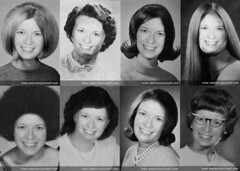
Those were the days... If, like me, you’re not quite ready to start a new workweek then I recommend YearbookYouself as an amusing distraction. [Thanks to Techcrunch.]

PS. For anyone wondering, none of those were actually my days, although this seems to come close.

Photos as notes

Sunday, February 3rd, 2008

While I realize not everyone is as obsessed with photography as I am, many phones now have cameras and I wonder if people remember to use them for the logistics of everyday life. So this post is just a reminder that all those things you often forget (I certainly forget all sorts of details that would be helpful to remember later) can be captured easily with your pocket-sized camera.

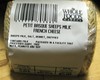
Cheese A recurring theme when I go shopping is trying to remember the name of that wonderful cheese I purchased earlier. Good cheese can be expensive so it’s a pity to buy the type that doesn’t work out. Last week after buying some cheese that turned out to be very tasty, I decided to take a picture of its label. Yesterday when I returned to the store I started looking for it. I couldn’t find it, but then I showed the image to the person behind the counter and immediately she had an answer. Although they were out of that particular item, she pointed me to another one that, upon sampling it, reminded me sufficiently of the earlier one that I was happy to find it. The woman mentioned that she wished more people would think to take photos as it’s usually difficult to guess what they want from their descriptions.

Princeton-Stanford intersectionThis method can work with all sorts of details that are easy to forget: book titles and authors, wines, where you parked your car, what you ordered off of a restaurant menu, bus & train schedules, maps (yup, I’ll just take a quick snapshot of a map instead of printing it out), and lots more. For some of these (like maps) a higher resolution photo where you can zoom in is helpful, but for others a simple camera phone should work just as well.

Photo update

Wednesday, January 30th, 2008

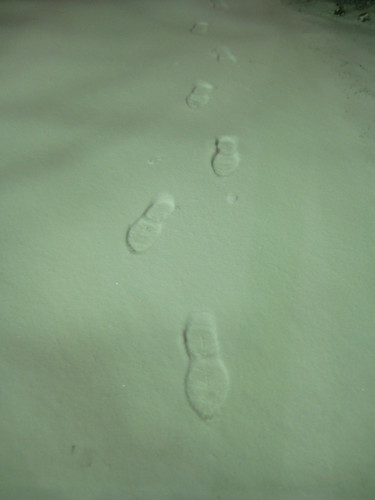
I feel like this photo I took last night says a lot about what I’m up to these days, on various levels, so here you go:


Footprints in the snow

Photos from Budapest trip

Wednesday, January 2nd, 2008

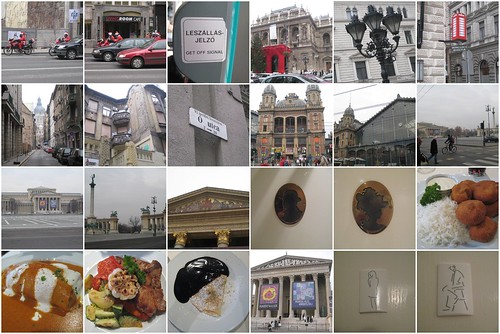
I didn’t get a chance to blog about my trip to Budapest a month ago. I had a really great time and took lots of photos so if curious then click through to my Flickr set on it for some beautiful architecture and some great food. The links below are just a small sampling and not necessarily of the best shots since it would’ve been too much work to customize the mosaic in that way.

Budapest mosaic

1. Santas on motorcycles, 2. Santas on motorcycles, 3. Get Off Signal sign, 4. Opera, 5. Street lights, 6. Mini telephone booth, 7. Basilica, 8. Old building, 9. O utca, 10. Train station by Eiffel, 11. Train station by Eiffel, 12. Heroes’ square, 13. Art Museum, 14. Heroes’ square, 15. Museum, 16. Men’s restroom sign, 17. Women’s restroom sign, 18. Fried mushrooms, 19. Hortobagyi palacsinta, 20. Chicken (with roasted garlic), 21. Gundel palacsinta, 22. Museum, 23. Women’s restroom sign, 24. Men’s restroom sign

Created with fd’s Flickr Toys.

My costume for next year

Saturday, November 10th, 2007

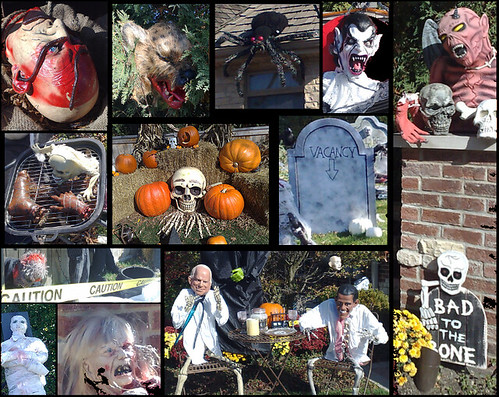
I didn’t mention Halloween here this year as I was just wrapping up a two-week four-stop trip, but I’ve come across something that I’ll link to regardless of the date: an awesome costume that I may just have to replicate next year. For additional Halloween geeky goodness, check out this Death Star pumpkin.

A year of photos

Wednesday, October 24th, 2007

One year ago today I started a project: take at least one photo each day and post it online. Yesterday, I took the 365th photo in the project and today I compiled a video of the set:


This has been an amazing experience and I’m going to continue with it. Setting aside a few moments each day to look around and find something worthy of a photo adds a very interesting and nice component to everyday life. I’ve started noticing things I never saw before. Looking back at the full set is also a great reminder of all that I’ve been up to over the last 12 months.

I highly recommend a hobby of this sort. I have two pieces of advice. First, it’s helpful to have a small enough digital camera that you can take it with you everywhere. You never know when a great photo opportunity will present itself. Second, don’t expect to maintain a separate blog or even blog section for this (as I naively did), it’s hard to find the time for that. Rather, post the photos to a community photo-sharing site like Flickr that makes posting and organization easy and can connect you to a group of people engaging in a similar project.

I want to send a shoutout to folks on Flickr who’ve been participating in this concurrently. A great community has built up around the project, which has been another great aspect of all this.

Mystery image

Sunday, September 16th, 2007

I’ve long enjoyed cropping images into abstract sections. I like discovering sections of things I don’t necessarily notice otherwise. It’s related to Project 365: taking a photo every day. That also helps discover things in one’s surroundings that otherwise may go unnoticed.

Since it’s a slow Sunday and I just happened upon one in my photostream that I like, I thought I’d post it here:

Guess the image

Any ideas?

(more…)

Chocolate poster

Monday, September 3rd, 2007

I got an email through Flickr letting me know that one of my photos was being used for a poster advertising an event at a science festival in York, UK on “Chocolate: nice but naughty?”. The poster:

Chocolate poster

I thought it was just going to be one of many chocolate photos, but there it is, center stage. Yes, I know, note the missing chocolate.

(Here’s the bigger (pdf) version of the poster.)

This photo, by the way, was the subject of a blog post here two years ago. To this day, it is among the 500 most interesting photos (#233 at the time of this writing) on Flickr for November 28, 2005.

I get a kick out of hearing that people find my photos useful so this was a treat.

How quickly fire spreads

Thursday, July 5th, 2007

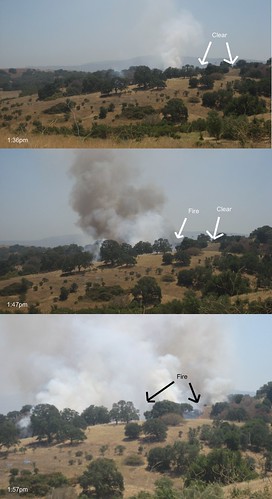
Before I get evacuated (not a completely crazy idea with the sheriff right outside my office), I thought I’d post just how quickly fire can spread depending on the circumstances.


How quickly fire spreads

I realize those are not on the same scale, but the surrounding trees should help identify the areas. Understand that I was just trying to do some work this afternoon and then headed out periodically to take some pictures. I didn’t set up shop for a sequence.

The distance between the fire and the nearest road is quite big so eventually the firetrucks just had to head up on the hill. By the time I finished taking photos that entire patch was dark although it looked like the flames had subsided. Of course, that’s just the part I can see, chances are there is lots of action invisible to me from here.

Now I’m going to try to get back to work, helicopters notwithstanding.

No Caption Needed

Monday, July 2nd, 2007

The link in my previous post is thanks to a new blog: No Caption Needed. It is both a book and a blog by my colleague Bob Hariman at Northwestern and his collaborator John Louis Lucaites at Indiana. This undertaking is “dedicated to discussion of the role that photojournalism and other visual practices play in a vital democratic society. No caption needed, but many are provided. . . .” The blog just started recently, but already offers all sorts of interesting images and commentary.

Now for something different…

Monday, July 2nd, 2007

Wow.

Try it here.

I should probably add this:
Time sink!

I’d prefer an ordinary afternoon…

Monday, June 25th, 2007

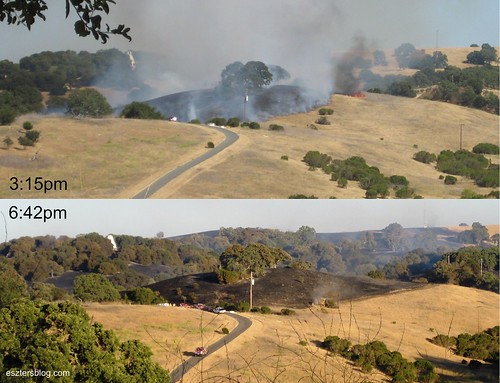
Comparing the hills during and after the fire

Just this morning I was contemplating how horrible it must be for the people who suddenly lost their homes in the fire around Lake Tahoe. By the afternoon I was watching firefighters from my office window battle flames on Stanford’s hills.

I was sitting at my desk already unable to work having just received word about the death of Peter Marris, Professor Emeritus of Urban Planning at UCLA, dear husband of Dolores Hayden who was a fellow Fellow at CASBS this year. The two of them had to end their year at the Center early, because Peter was sick, but I don’t think any of us expected things to escalate so quickly.

Unable to concentrate on work, I turned around to look at the beautiful view from my office. I spotted some big red flames. Soon I realized that a large area around it was completely black with smoke and flames on the periphery. Eventually sirens and helicopter appeared, as did firefighters. Some of the smoke was now white not just black, apparently a good sign. But not all the black smoke disappeared and an hour later there was still much activity. I went to an event and by the time I got back to my office, another hillside was completely black (see the difference in the left area of the two photos above).

How quickly things can change.

Photo updates

Friday, April 6th, 2007

I’ve been doing lots of fun things recently much of which I’ve documented, of course.:)

So here are some links to photo sets on Flickr. I also link to the slideshow version. I think those work best if you tweak the timing to no more than 2 seconds per image, just slide the bar in the upper right corner of the tool.

Elephant seals!

Tuesday, January 9th, 2007

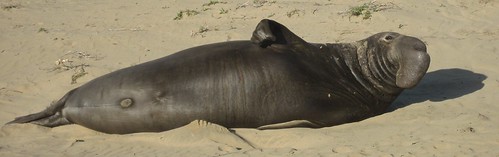
Elephant seal

Wow, I went on an amazing tour on Sunday to the Año Nuevo State Reserve on the coast. Elephant seals only come on land twice a year and for not too long so you can’t just go to the coast and expect to catch a glimpse of these amazing creatures. The weather was absolutely gorgeous adding to the experience.

I think the photos may convey it all best. I recommend the slideshow view for this, you can adjust timing (say, to 2s) on the top for a quicker move through the album.

I also have a video compilation up at YouTube. It starts out a bit slowly, but at .50 you can see a bit of male fighting then at 1:15 you have a male approaching a female and at 1:25 there’s some very cool movement by two males. Unfortunately, I couldn’t really capture the sounds they were making due to the wind.

You’ll notice a bit of sand throwing. They do this to keep cool. They don’t eat at all while on land so they have a ton of fat stored away, which works well when hundreds (if not thousands) of feet deep in cold water, but not so well on a sunny beach.

Photo editing

Friday, December 29th, 2006

As if my photo hobby needed any added components, I have finally gotten around to doing a bit of editing on my photos. Here is one result:


Bike rack black and white with glow effect

There is a group on Flickr called Which do you prefer? where you can post a couple of photos and ask others to tell you which one they prefer and why. In response to such a request, a user suggested I try out my bike rack photo in black and white.

After changing it to B&W, I decided to play around with it a bit more. I ended up trying out the Glow effect under the Effects menu in the handy free Windows program Paint.NET. I used the following settings: Radius 3, Brightness 4 and Contrast 39. Above is the result. I think it works best with a black frame, thus the border around it.

By the way, this is the original:


Bike rack 3

Project 365: #38-#44

Monday, December 25th, 2006

Those of you who read my blog, but do not visit my Flickr account may be thinking that I abandoned Project 365 weeks ago. Not so! I have been very diligent about taking at least one photo (if not dozens) every day and designating one for the Project 365 set each day. Before the year is over, I hope to catch up with posting these to the blog.

Decadence table

Taken: December 1, 2006

#38: At the last social hour at the Center, we decided to expand the Wine Committee into the Decadence Committee, because, well, some of us don’t like wine, but more importantly: there are more ways than one to be decadent. So we created a Cheese Committee and a Chocolate Committee. Which one do you think I’m in? These were the fruits of our labor. More coming next time.

Red fountain water

Taken: December 2, 2006

#39: In honor of the big Stanford-Cal football game the next day, the fountain water was turned red (bright pink is a more like what it was, but I am assuming the goal was red).

Turtle

Taken: December 3, 2006

#40: I got a great deal on Cranium Pop 5 (<$11 including shipping!) and as soon as it arrived, I had some friends over for a game. This is my teammate’s rendition of Teenage Mutant Ninja Turtles, which needless to say, I guessed.:)

Project 365 email

Taken: December 4, 2006

#41: Screenshot of an email singing the praises of Project 365 and why more who like photography should join! (hint)

Sex and the City book cover

Taken: December 5, 2006

#42: Sex and the City Kiss and Tell book, a must for any SATC fan.

Orange leaves, blue sky

Taken: December 6, 2006

#43: Leaves in the Center parking lot.

http://www.flickr.com/photos/eszter/316921200

Taken: December 7, 2006

#44: Spotted on East Campus Drive at Stanford, reminded me of all the work my project group and I are doing.. although likely not quite the same type of surveying.

Gorillapod

Sunday, December 24th, 2006

I just put in an order for the Gorillapod that has come recommended to me by a couple of fellow Flickrites. You can get free ground shipping and a 15% discount if you buy it on Joby and put in the code gorillapodlove, which is something they’ve made available until the end of this year. (That Flickr group page says 10%, but it was 15% off.) Enjoy!

UPDATE (12/26/06): I had a bad experience trying to use Paypal for payment and in the end it didn’t work. Joby seems to care about customer experiences so I emailed them about this, but the response I received was very generic. So take note that 1. you may not be able to use Paypal for a purchase on joby.com; and 2. don’t bother sending an email to 100percent@joby.com.

Where’s Waldo, 21st century edition

Friday, December 15th, 2006

Wow. These images are amazing. Viewing these may benefit considerably from a high-speed connection and definitely from a large screen.

In case you can’t get to it, it may be that the site is being blocked by your school/workplace, because years ago it was an “adult site” and it got banned by a bunch of filters. That raises an interesting point about buying domain names. It’s worth looking into their past. In this case, a quick check on the Wayback Machine would’ve helped.

In any case, the images are amazing, enjoy if you can get to them.

Gift guide: DIY photo projects (& a request for the number 3)

Wednesday, December 6th, 2006

‘Tis the season for buying gifts (lots of us have December birthdays*, you know). So I’m starting a discussion of various gift ideas. My plan is to post about items that I have bought myself and so can recommend with confidence. Alternatively, I may suggest some do-it-yourself projects on occasion.

I’ll start things off with the latter. Consider giving someone a personalized memory game made up of photos that would be of interest either because they portray people/places of interest to the person, or because they are simply great photos. More details on this here. Note, however, that creating multiple wallet-sized photos can get expensive quickly. If you’re short on cash, but have time, you may consider editing images that contain a pair of two images each and then simply getting the regular size photos of these. That way, you can get two pairs for 5-10c each instead of 99c each with a leftover pair.

Another idea is to use one of the many amusing tools from fd’s Flickr toys. You can create a funny motivation poster, a magazine cover, a movie poster, or lots of other things and get these printed out. Regular size photo print-outs are only about 10-20c so definitely on the cheap side. And note that despite the site’s name, these don’t require a Flickr account, you can upload a photo directly from your computer.

Photojojo has additional ideas. I am intrigued by their Fotoclips selling for $15 (including shipping), but I haven’t bought any of those nor have I ever tried them out so this is just a pointer, not a recommendation.

Of course, nowadays, you can get a photo printed on just about anything, but the above items are mainly do-it-yourself so fairly cheap and have that extra personal touch.

* No worries, I’m well aware of the comment “There comes a time when you should stop expecting other people to make a big deal about your birthday. That time is age eleven.” Nonetheless, if you care to contribute to my upcoming celebrations, I’m collecting photos of the number 3 from around the world. So email me one if you can (or better yet, post one on Flickr and send me the link). (Yes, I know I can find tons of 3s on Flickr, but these would be from you to me.:)

New Flickr features

Saturday, November 25th, 2006

For those of you not following the official Flickr blog, here are a couple of exciting features introduced recently:

1. Mobile support. Just point your mobile browser to m.flickr.com. Yes!

2. Guest passes to otherwise private photos. One possible limitation of Flickr is that in order for friends and family to see private photos, they have to log in to the system. But we all have friends and family who don’t want to be bothered. Well, now they don’t have to do anything, but click on a link to your otherwise private photo set. Go to one of your sets, click on “Share this set”, enter people’s email addresses and there you go.

If you like sharing photos with others and you don’t use Flickr then can you please comment on this post and let me know why? Because it is an awesome service and I keep waiting for more of my friends to start using it, and given all of its features, I don’t understand why more people aren’t coming on board.

I realize it’s not the most user-friendly site if you don’t know anything about it, but you can laarn quickly. And there are some tutorials to help you.:)

Also, another perhaps not widely-understood feature is that you can upload photos simply by emailing them to your account. You don’t have to bother with their upload tools if you don’t want to. I just thought I’d point out that additional helpful feature.